There are two ways to remove the connection between your business account the Vimeo account.
- Via integration page in SpurrOpen.com.
- Manually via your account in Vimeo.
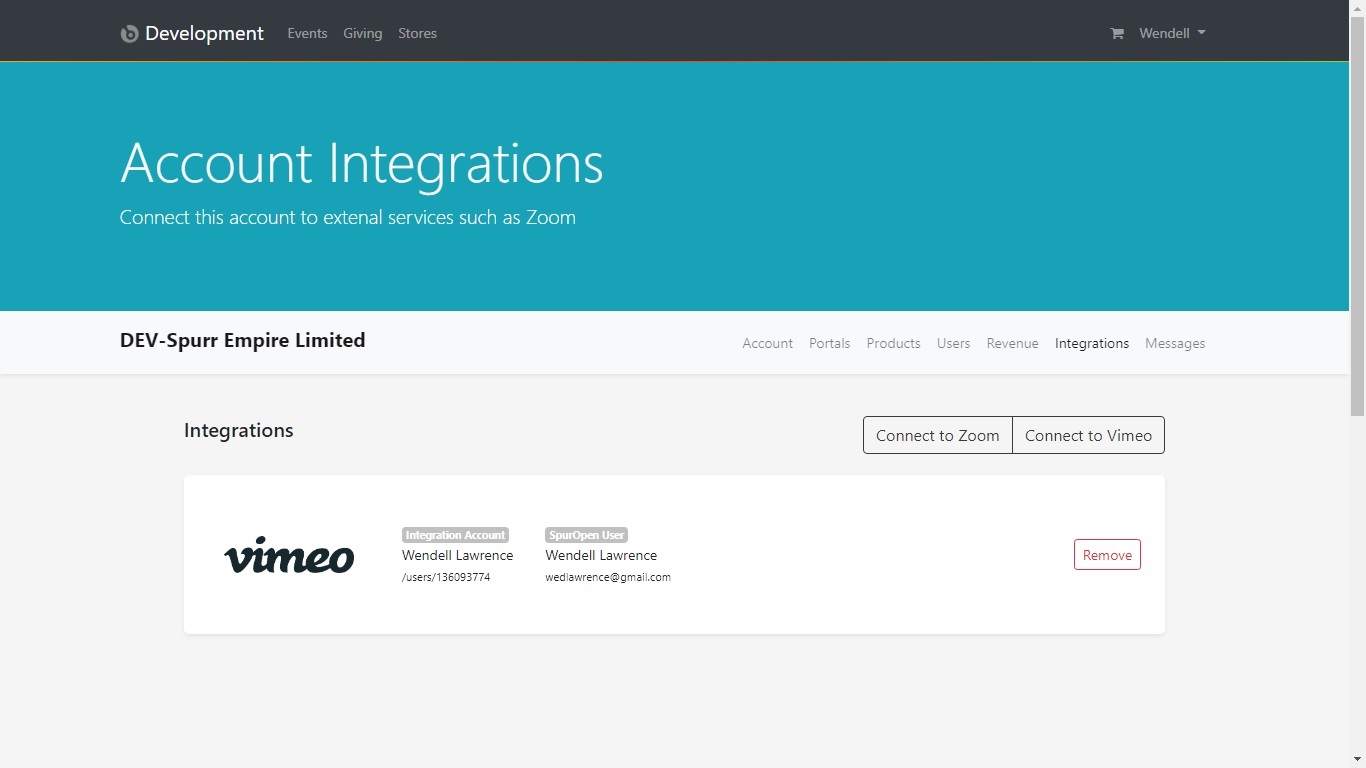
Via integration page in SpurrOpen.com
Doing it via this method will remove the connection from the SpurrOpen.com system only. The app will still register as installed in your Vimeo account. Your user data and settings will not be removed from the SpurrOpen.com system. All products that were using the connection will be set to inactive, and will require a new connection to be re-activated.
Steps
- Login to SpurrOpen.com and navigate to Manage Accounts.
- Select the respective business account from the listing.
- Click Integrations from the account menu.
- Look for the Vimeo integrations and select Remove.
Note that this method does not remove Authorization from the Vimeo App Marketplace. To do so, a manual uninstall via your Vimeo account is required.
Manually via your account in Vimeo
THIS METHOD BY IT SELF IS NOT RECOMMENDED. Doing it via this method will remove the connection from your Vimeo account ONLY. The SpurrOpen.com system will not be able to communicate with Vimeo on your behalf, and will be unaware of the disconnection, until you manually remove it as described in option one (1) above. The products that were using the connection will produce an error when a user attempts to access them.
Steps
- Login to your Vimeo Account and navigate to your account settings.
- Click Connected Apps and look for the SpurrOpen app.
- Click the Connect/Disconnect beside the app in the listing.
- Then complete the steps in option one (1) above.
Was this article helpful?
That’s Great!
Thank you for your feedback
Sorry! We couldn't be helpful
Thank you for your feedback
Feedback sent
We appreciate your effort and will try to fix the article