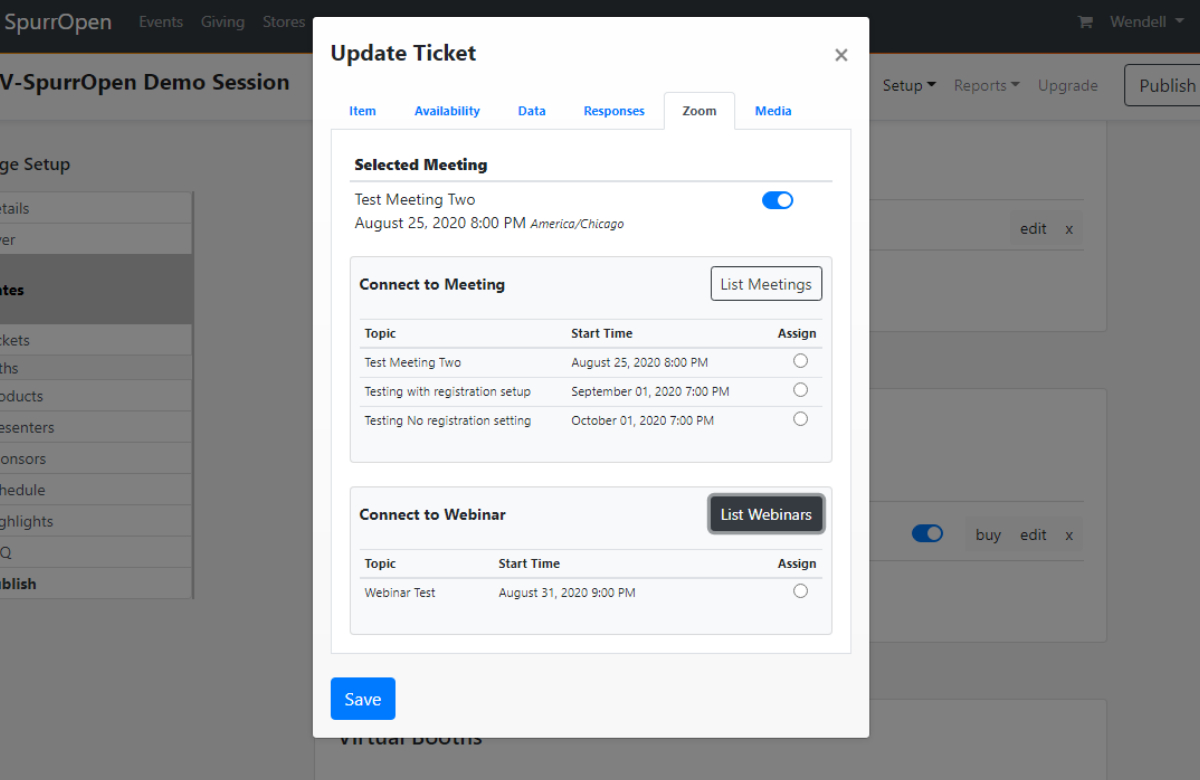
These step will associate a Zoom Meeting or Webinar to a SpurrOpen product. When ever a user purchases the product, they will be automatically registered for the meeting or webinar.
Steps
- Login to SpurrOpen.com and navigate to Manage Accounts.
- Select the respective business account from the listing.
- Click Portals from the account menu and select the respective portal.
- Add a new product/ticket or select an existing one.
- Select the Zoom tab and click List Meetings for meetings or List Webinars for webinars.
- Select a meeting or webinar from the list of available ones and select Save.
Was this article helpful?
That’s Great!
Thank you for your feedback
Sorry! We couldn't be helpful
Thank you for your feedback
Feedback sent
We appreciate your effort and will try to fix the article