Once your SpurrOpen account has been created, you can log in and access your dashboard to manage your account, items, and settings.
Logging In to Your Account
- Go to SpurrOpen.com.
- In the top-right corner, select Sign Up / Login.
- Enter your email address and password.
- Click Login.
After successfully signing in, you will be directed to your Dashboard.
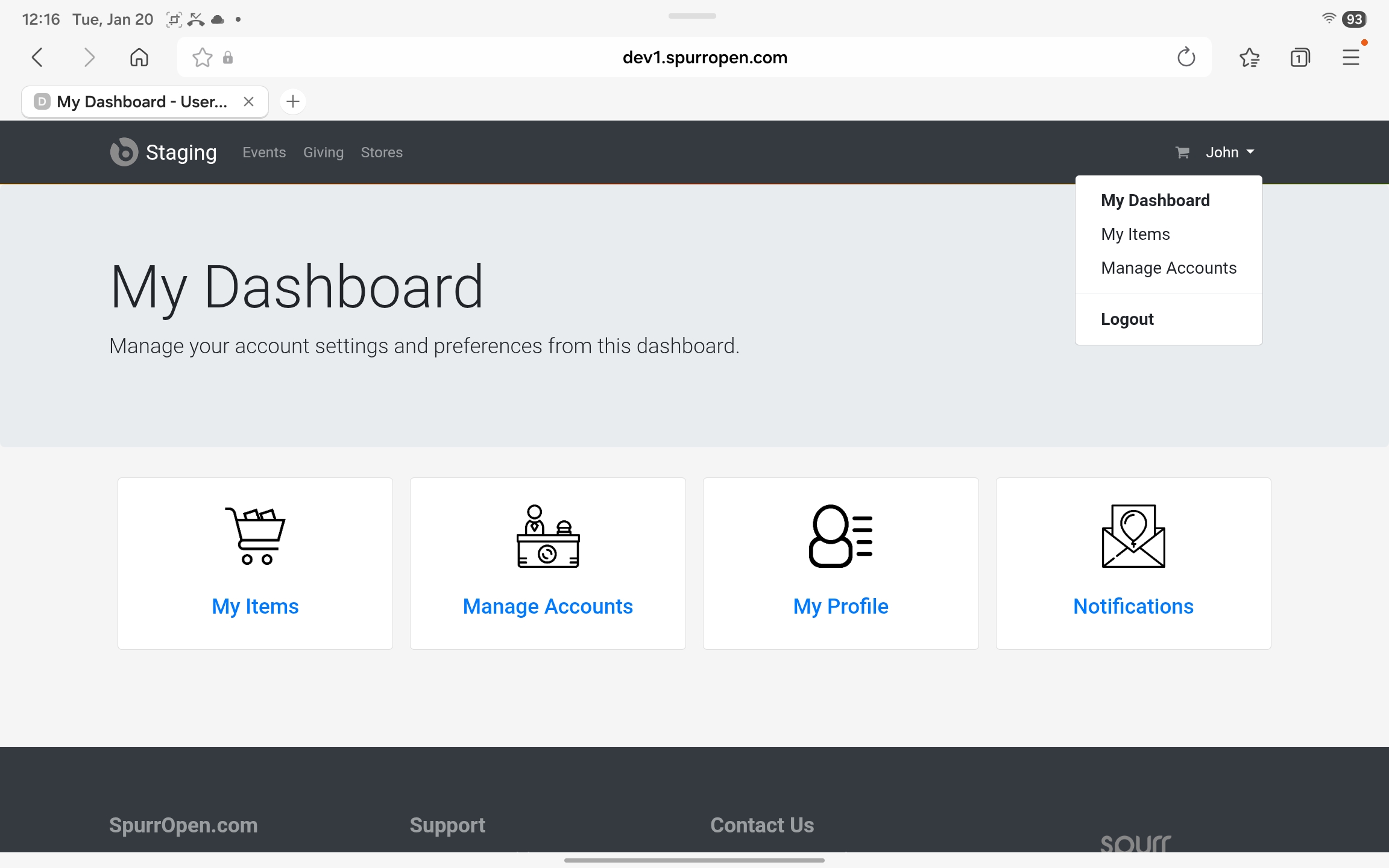
Accessing the Dashboard
You can access your dashboard at any time by:
- Selecting your name in the top-right corner of the screen.
- Clicking My Dashboard from the menu.
The dashboard provides a centralized view of your account and available actions.
Navigating the Dashboard
From the My Dashboard page, you can access the following sections:
My Items
View and manage your events, tickets, purchases, or other items associated with your account.Manage Accounts
Manage linked accounts, permissions, or organizational access (if applicable).My Profile
Update your personal information, login details, and password.Notifications
View important alerts and account-related messages including invitations.
Each section is accessible by selecting the corresponding card on the dashboard.
Logging Out
To log out of your account:
- Select your name in the top-right corner.
- Click Logout.
Was this article helpful?
That’s Great!
Thank you for your feedback
Sorry! We couldn't be helpful
Thank you for your feedback
Feedback sent
We appreciate your effort and will try to fix the article