The event details section of the is where you specify the event name, description and other details about the nature of the event.
Steps to access
- After accessing the event portal
- Select Setup from the menu, then select Page Setup
- Look for the section lebeled "Details"
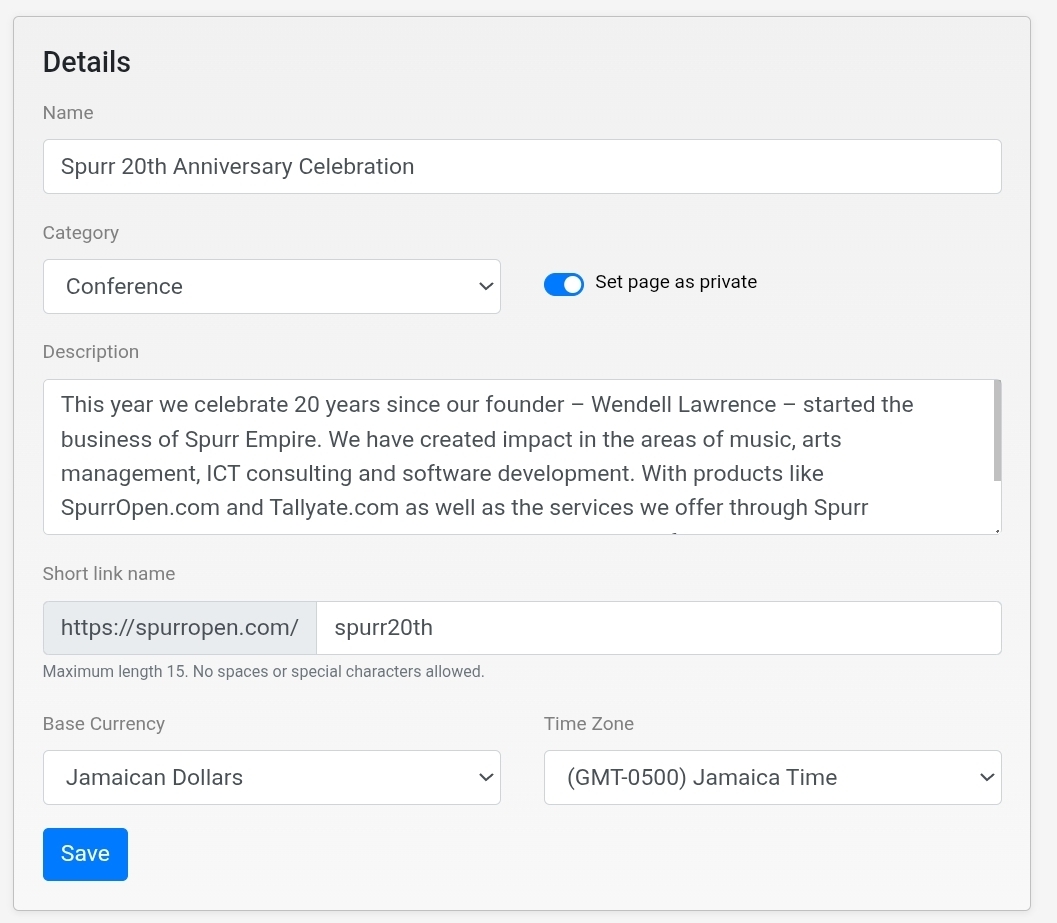
You should see a form that allows you to enter the folliowing information
- Name -The name or tifle of the event.
- Category - Used to classify the event
- Description - Used to provide a brief summary of the event
- Short link name - is the 15 character name that is used as a part of your event link to make it easy to remember
- Base Currency - is the default currency for pricing products on the event. If the purchaser choses to use another currency, a conversion will be done fom this currency to the user selected.currency
- Time Zone - is the time zone of the location where the event is being held.. All time automations and reminders will be based on this.
Changes made on in this section will be saved automatiaclly. However to be sure, we recommend that you use the save button as well
Was this article helpful?
That’s Great!
Thank you for your feedback
Sorry! We couldn't be helpful
Thank you for your feedback
Feedback sent
We appreciate your effort and will try to fix the article