The "Data" tab on the ticket on SpurrOpen, allows you to enter the information you wish to capture about a patron. You may restrict a patron from utilizing the same email on a particular product/service or even across products/services during an event. You also have the option of asking additional questions based on your requirements. Please ensure that the toggle switch is turned on the information you wish to catpture.
Steps to follow:
- After accessing the event portal
- Go to "Ticket Setup"
- Click on the word "Edit" beside the ticket
- Click the "Data" tab
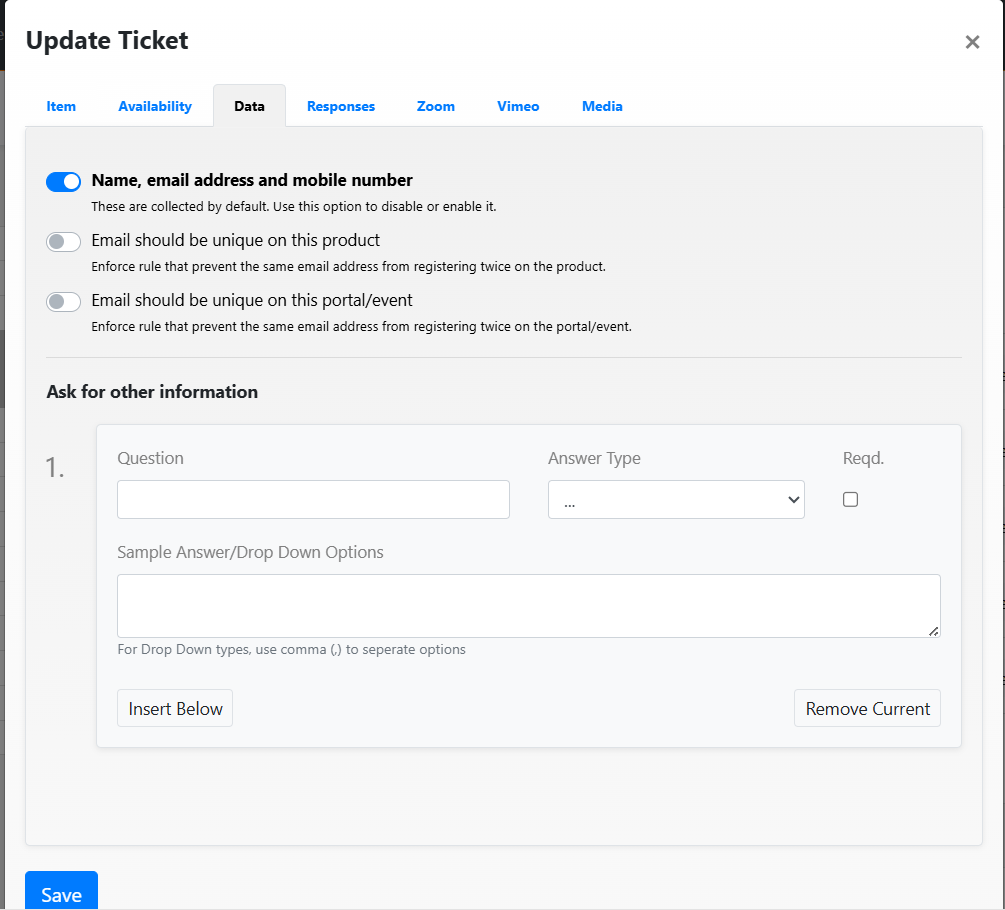
Additional steps to follow:
- Enter name, email address and mobile number. This is basic information that we recommend that you capture
- Email should be unique to this product - If this option is selected, the patron can only use their email once to complete a purchase
- Email should be unique to this portal/event - If this option is selected, the patron is not allowed to purchase more than one item type of item or service on the portal/event
- Ask for other information. You may want to capture additional information about a patron. To do so, you may add a question and select your answer type. To make the question mandatory, ensure the required check box is checked
- To add more questions, click "Insert Below" and to remove a question, click on "Remove Current".
- Click save
Was this article helpful?
That’s Great!
Thank you for your feedback
Sorry! We couldn't be helpful
Thank you for your feedback
Feedback sent
We appreciate your effort and will try to fix the article